Writing Tips

How to Write an Email Professionally — A Complete Guide With Examples

how to write an email professionally
Written by Mason

Email is still the most powerful form of professional communication — and one of the most misused.

Most people have been on the receiving end of an email that felt vague, oddly worded, too casual, or simply unclear about what it wanted. It is frustrating. And the worst part is that the person who sent it usually had no idea the impression it was making.

The truth is, a well-written email can open doors. It can land you a job interview, win a client’s trust, get a fast response from someone who normally takes days to reply, or make you look like someone who has their act together. A poorly written one can quietly do the opposite, before you have even had the chance to meet the person.

This guide will show you, step by step, exactly how to write an email professionally — with real examples at every stage.


What Does “Professional” Actually Mean in an Email?

This is worth clarifying before anything else, as many people misunderstand it.

Writing professionally does not mean writing stiffly or using complicated vocabulary. It does not mean sounding like a legal document. It means being clear, purposeful, and respectful of the other person’s time. It means your email is easy to read, easy to act on, and leaves the reader with a positive impression of you.

An unprofessional email, by contrast, tends to be vague about its purpose, too casual in tone, difficult to follow, or full of small errors that suggest the writer did not bother checking it before hitting send.

Once you understand that professional simply means clear and thoughtful, the whole thing becomes much less intimidating.


Start With the Right Email Address

Before a single word of your email is read, the recipient has already seen one thing: your address.

If you are emailing a potential employer, a new client, or a professor and your address is something casual from your school days — think nicknames, random numbers, or phrases that made sense when you were fifteen — it will quietly undermine your credibility before the email is even opened.

A professional email address should simply contain your name. Something like firstname.lastname@gmail.com or your official work address if you have one. It is a small thing that takes minutes to set up and makes a noticeable difference to how you are perceived.


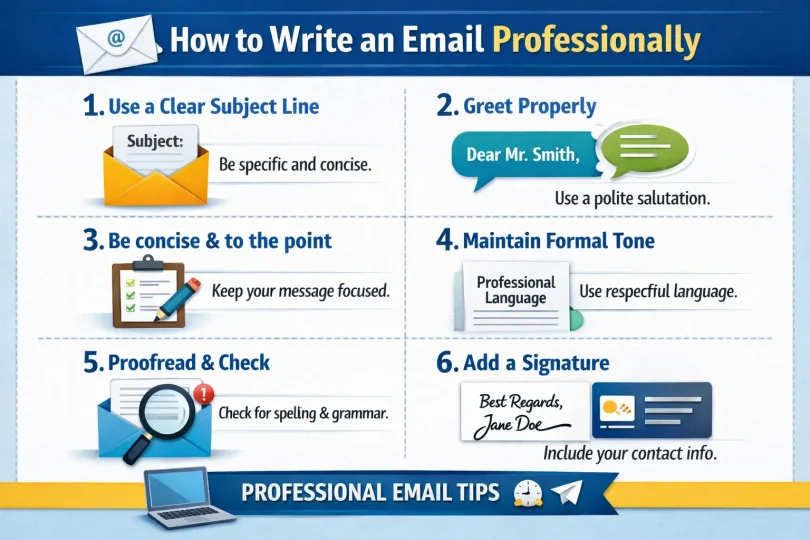
Write a Subject Line That Actually Gets Opened

The subject line is the most important line in your entire email. If it does not work, nothing else matters — because the email will not be opened.

A strong subject line tells the reader exactly what the email is about and gives them a reason to open it. It is specific, brief, and informative.

Here is the difference in practice:

Weak:

  • Hi
  • Quick question
  • Following up
  • Important

These tell the reader almost nothing. They are easy to overlook, easy to delay, and easy to forget.

Strong:

  • Job Application — Digital Marketing Executive — Sara Ahmed
  • Invoice #4812 — Payment Due by 25 April
  • Request to Reschedule Thursday’s Call
  • Question About the Submission Deadline — ENG 301
  • Feedback Needed on Draft Proposal — Due Friday

Notice what these have in common. They are specific. They mention the relevant detail — a name, a number, a date, a course code. The reader knows immediately what they are about to open.

Keep your subject line under sixty characters so it displays fully on mobile screens. Avoid writing in all capitals. Avoid phrases like “URGENT!!!” unless something genuinely is urgent — and even then, use it sparingly.


Open With the Right Greeting

Your greeting sets the tone for everything that follows. Get it right and the rest of the email reads smoothly. Get it wrong and the reader is already slightly put off before they reach your actual message.

The right greeting depends on how well you know the person and the formality of the situation.

For formal situations — first contact, senior professionals, clients you have never met, academic staff:
Dear Mr. Johnson,
Dear Dr. Patel,
Dear Professor Williams,
Dear Hiring Manager,

For semi-formal situations — colleagues, contacts you email regularly, people in a similar role to yours:
Hello Sarah,
Hi James,
Good morning,

A few things to avoid:

“Hey” is too casual for almost any professional context. “Dear Sir/Madam” sounds outdated — use the person’s name whenever you have it. Starting with no greeting at all feels abrupt, even in short emails. And “To Whom It May Concern” should only be used when you genuinely have no idea who will read the message.

Always follow your greeting with a comma, then begin your message on the next line.


State Your Purpose in the Opening Lines

After your greeting, the first sentence or two of your email should immediately tell the reader why you are writing.

This is the part most people get wrong. They ease into the message slowly, spend a line or two on pleasantries, and bury the actual purpose somewhere in the middle. By then, a busy reader may have already moved on.

Here is what effective opening lines look like:

  • “I am writing to apply for the Content Editor position advertised on your careers page.”
  • “I wanted to follow up on our conversation from last week regarding the revised project timeline.”
  • “Could you please confirm whether the Friday afternoon session is still going ahead?”
  • “I have attached the updated proposal you requested — please let me know your thoughts whenever you have a chance.”

Each of these tells the reader exactly what is happening and what — if anything — they need to do. That clarity is what keeps your email from sitting unanswered at the bottom of someone’s inbox.

One phrase worth avoiding as an opener: “I hope this email finds you well.” It is not wrong, but it has been used so many times that it has become essentially meaningless filler. If you want to acknowledge the person warmly, be specific — “I hope the conference last week went well” feels genuine in a way that the standard opener no longer does.


Structure the Body So It Is Easy to Read

The body of your email should be easy to follow at a glance. Most professional emails are read quickly — often on a phone, often between other tasks. Structure accordingly.

Keep your paragraphs short. Two to four sentences per paragraph is usually enough. A long block of unbroken text, no matter how well written, will lose the reader somewhere in the middle.

If you have multiple questions or points, give each one its own space rather than cramming everything into a single paragraph. This makes it much easier for the reader to address each point individually when they reply.

Cover one main topic per email whenever possible. If you find yourself needing to address three completely unrelated things, consider whether some of them belong in separate emails. It keeps the conversation cleaner and makes it easier for the reader to respond, file, and act on what you have sent.


Get the Tone Right

Tone is the hardest part of professional email writing to master — and the most common source of misunderstanding. The goal is to sound confident without sounding cold, and warm without sounding too casual.

Be direct, but polite. There is a real difference between “Send me the file by Thursday” and “Could you please send me the file by Thursday?” The second version takes a few extra seconds to write and creates a noticeably better impression. It sounds like a request rather than a demand, which matters more than most people realise.

Do not write when you are frustrated. If someone has ignored your previous messages and you are tempted to let them know that in no uncertain terms, step away first. Emails written in frustration almost always need to be rewritten. What feels satisfying to type in the moment rarely lands well on the other end.

Avoid passive-aggressive phrases. “As per my previous email,” “As I clearly mentioned,” and “Per our last conversation” have become widely recognised signals of professional irritation. They rarely improve the situation and often put the reader on the defensive before they have even reached your actual point.

Avoid sarcasm entirely. It works in spoken conversation because tone of voice carries the meaning. In written text, especially across professional or cultural lines, sarcasm almost always just reads as rude.


Close With a Clear Next Step

Before you sign off, make sure the reader knows what you want to happen next.

Emails without a clear next step often go unanswered — not because the reader is ignoring you, but because they are genuinely unsure what you want from them. A clear closing line removes that uncertainty.

“Please let me know if Tuesday at three works for a call.”
“Could you review the attached document and share your feedback by end of the week?”
“I will follow up again on Thursday if I have not heard back by then.”
“No action needed on your end — I just wanted to keep you in the loop.”

Being specific about what comes next is one of the simplest ways to get faster, clearer responses to your emails.


Choose the Right Sign-Off

Close with a sign-off that suits the tone of your message, followed by your name.

For formal emails:
Yours sincerely,
Best regards,
Kind regards,

For semi-formal emails:
Best,
Thanks,
Warm regards,
Many thanks,

Avoid abbreviations like “Thx” or “Rgds” in professional contexts. Avoid leaving no sign-off at all. And “Cheers,” while perfectly fine among colleagues you know well, is too casual for most formal situations.

In first-contact or formal emails, follow your name with your job title, company, and contact information. This gives the recipient everything they need to know who you are and how to reach you.


Always Proofread Before Sending

Read your email back once before you click send. Out loud if you can. This is the step most people skip, and it is the one that prevents genuine mistakes.

Ask yourself: Is the subject line clear and specific? Does the first sentence tell the reader why I am writing? Is the tone right for this person? Are there any sentences that could be misread? Are there any spelling or grammar errors?

One typo in a job application. One sentence that reads as blunt when you meant to be straightforward. These are small things that leave impressions that can be surprisingly difficult to undo. Thirty seconds of re-reading is almost always worth it.


Real Examples of Professional Emails

Applying for a Job

Subject: Application for Marketing Coordinator — Ayesha Raza

Dear Ms. Chen,

I am writing to apply for the Marketing Coordinator position advertised on your website. I have three years of experience in content marketing, with a focus on social media strategy and email campaigns. In my current role, I helped grow our newsletter subscriber base from 4,000 to over 22,000 in eighteen months.

Please find my CV and a short cover note attached. I would welcome the opportunity to discuss how my experience aligns with what you are looking for.

Thank you for your time and consideration.

Kind regards,
Ayesha Raza


Following Up After No Response

Subject: Follow-Up — Proposal Sent 10 April

Hi David,

I hope your week is going well. I wanted to follow up on the proposal I sent over last Thursday, as I have not yet heard back.

I completely understand if things have been busy on your end. Please let me know if you have any questions or if you would like to schedule a quick call to go through it together.

Best,
Nadia Iqbal


Asking a Professor a Question

Subject: Question About Submission Format — ENG 301 Assignment

Dear Professor Ali,

I am a student in your Thursday ENG 301 class. I have a quick question about the upcoming essay due on April eighteenth — should it be submitted as a Word document or a PDF through the portal?

Thank you for your time. I look forward to hearing from you.

Sincerely,
Tariq Hassan
Student ID: 20221045


Apologising for a Delay

Subject: Apology for Late Submission — Project Report

Dear Ms. Thompson,

I am writing to apologise for submitting the project report after the agreed deadline. I encountered some unexpected technical issues that caused the delay, and I take full responsibility for not flagging this earlier.

The completed report is attached. I have reviewed it carefully to ensure it meets all the requirements we discussed. I appreciate your understanding and will make sure this does not happen again.

Kind regards,
Sara Imran


Requesting a Meeting

Subject: Request for a Brief Meeting — Q3 Strategy Discussion

Dear Mr. Hassan,

I hope you are having a good week. I am working on the Q3 content strategy and would value thirty minutes of your time to walk through the key priorities before we finalise the plan.

Would any time work for you this Thursday or Friday? I am flexible around your schedule.

Many thanks,
Omar Sheikh
Content Strategist


Declining an Invitation Politely

Subject: Re: Invitation to Speak at April Conference

Dear Ms. Williams,

Thank you so much for the kind invitation to speak at the April conference. I am genuinely honoured to be considered.

Unfortunately, I have a prior commitment that week that I am unable to move. I hope the event goes extremely well, and I would love to be considered for a future opportunity if one arises.

Thank you again for thinking of me.

Warm regards,
Dr. Farah Noor


Quick Checklist Before You Send

Go through this before every important email:

  • Professional email address used
  • Subject line is specific and under sixty characters
  • Greeting matches the level of formality
  • Purpose is clearly stated in the opening lines
  • Body is short, focused, and easy to read
  • Tone is polite and appropriate throughout
  • Clear next step or call to action included
  • Sign-off and full name are present
  • Proofread at least once before sending

A Final Thought

Writing professionally is not about impressing anyone. It is not about using formal vocabulary or making your emails sound more important than they are. It is about being clear. It is about making it easy for the other person to understand what you need and to respond.

Once you build the habit of following these steps, writing professional emails actually takes less time — not more. Because instead of staring at a blank screen wondering how to start, you already have a structure in your head before you type a single word.

And if you want to make sure your writing is clean and error-free before sending anything important, our free grammar and spell checker can help you catch mistakes quickly before they reach the wrong inbox.

About the author

Mason

Leave a Comment